Remove Space in Token Default Value | Community
Skip to main content
January 17, 2013
Solved

Remove Space in Token Default Value

  • January 17, 2013
  • 13 replies
  • 4833 views

We are using a "First Name" token in a welcome email to new signups on our website. Our signup form has a First Name field, but it is not required. Therefore, if someone does not put a value in that field when they signup, we will not have a first name value to include in the welcome email. Therefore we need to set a default value. We want to set our default value as [nothing] (so it would show up in an email as "Hello,"). However, when this happens, Marketo is not removing the blank space between "Hello" and the FirstName token value (so it shows up as "Hello ,"). Does anyone know how we can remove this blank space, or will we have to make-do with it?

Thanks in advance!


Andrea
This post is no longer active and is closed to new replies. Need help? Start a new post to ask your question.
Best answer by
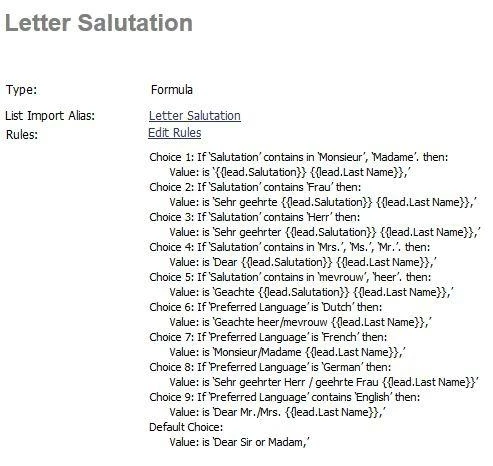
My 2 cents. Rather than making salutations on the fly, I have a specific salutation field setup. My company markets in 6 languages, so we have to take cultural differences into account, so I have to know that in Germany they need salutation + sex + Last name, but in france it's completely different.

Instead I have a single field, which then looks to see what salutation you have. If you have no salutation, then it looks for your preferred language, etc.


So my answer is, instead of worrying about a space, instead setup the field to give you the results you want each time, regardless of whether or not a first name is in...

PS - Notice that the comma is IN the field. It isn't after the salutation, but contained within it.

13 replies

November 9, 2015

This works for me:

#set ($firstName = ${lead.FirstName})

#if ($firstName == "")

  #set($temp1 = "Hello,")

#elseif ($firstName.contains(" "))

  #set($temp1 = "Hello,")

#elseif ($firstName.length() == 1)

  #set($temp1 = "Hello,")

#else

  #set($temp1 = "Hello " + $firstName + ",")

#end

${temp1}

James_Glavin
New Participant
February 24, 2015
I'll add my thoughts to this thread, even thought it's a bit of an old one; I was scratching my head about the space plus comma issue too.

I considered this solution:

Hello {{lead.First Name:default=!}}

which results in 'Hello !' if you don't have a first name for a lead. It's not technically correct punctuation, but I preferred how it looked to just 'Hello' on it's own with no punctuation at all.

But in the end I went for: 

Hello {{lead.First Name:default=there}},

So you either get

Hello James,

or

Hello there,
 
July 22, 2014
This thread is helpful! I was having the same space issue as Andrea is having above. Guess I will just remove the comma.

August 20, 2013
Here is a possible solution - the value of your token when you have a sponsor would be ", and a special thank you to our sponsor [sponsor name]."  And the default value for your token would be "."  Place your token immediately after the word "week" with no following comma or space.
August 20, 2013
I can't help you with the space. There's no such thing as a negative space. If it were me I'd just leave the default for the token blank if there was no value.  {{my.eventsponsor}}
August 19, 2013
Elliott, we don't create segments basedon the my.token.  In this case we create smartlists based on a field like "Region", and then clone the event program one-for-each-region, and popluate all tokens to be specific to the event... to automate things some.  it's just that some events have a sponsor, some have a "host" we need to thank, some have follow up materials etc... and the more we can automate/the less we have to edit each email, the better. 
August 19, 2013
I can only think that you'd need a separate email since you can't create a segment (for dynamic content) using a my token.  But I'll bet Adam can come up with a completely out-of-the-box solution for this :0)
August 19, 2013
I'm very interested in this as well,  but our use case is different:  rather than just salutations, we use tokens as text for example 

Thanks for attending the {{my.eventname:default=event}} this past week, and a special thank you to our sponsor {{my.eventsponsor:default=??????}}.  

Where sometimes we have a sponsor and sometimes we don't.  This is a goofy example, but we encounter several variations on this them.  The challenge of course is that the punctuation/spacing get messed up.  Any suggestions for a situation like this?

Thanks!
Accepted solution
January 18, 2013
My 2 cents. Rather than making salutations on the fly, I have a specific salutation field setup. My company markets in 6 languages, so we have to take cultural differences into account, so I have to know that in Germany they need salutation + sex + Last name, but in france it's completely different.

Instead I have a single field, which then looks to see what salutation you have. If you have no salutation, then it looks for your preferred language, etc.


So my answer is, instead of worrying about a space, instead setup the field to give you the results you want each time, regardless of whether or not a first name is in...

PS - Notice that the comma is IN the field. It isn't after the salutation, but contained within it.
January 17, 2013
Try this:

Hello{{ lead.First Name:default=}},

The space if front of lead seems to do the trick :) 


Disregard. Breaks the token