Remove Space in Token Default Value | Community
Skip to main content
January 17, 2013
Solved

Remove Space in Token Default Value

  • January 17, 2013
  • 13 replies
  • 4833 views

We are using a "First Name" token in a welcome email to new signups on our website. Our signup form has a First Name field, but it is not required. Therefore, if someone does not put a value in that field when they signup, we will not have a first name value to include in the welcome email. Therefore we need to set a default value. We want to set our default value as [nothing] (so it would show up in an email as "Hello,"). However, when this happens, Marketo is not removing the blank space between "Hello" and the FirstName token value (so it shows up as "Hello ,"). Does anyone know how we can remove this blank space, or will we have to make-do with it?

Thanks in advance!


Andrea
This post is no longer active and is closed to new replies. Need help? Start a new post to ask your question.
Best answer by
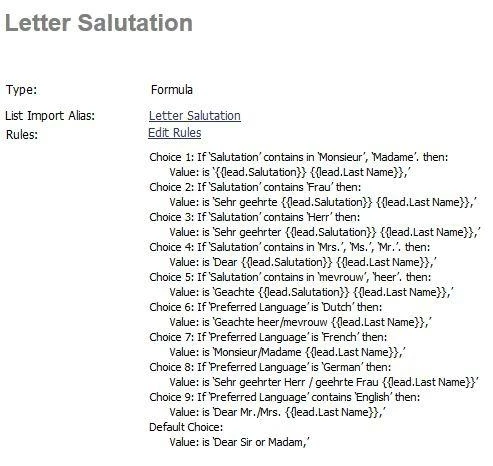
My 2 cents. Rather than making salutations on the fly, I have a specific salutation field setup. My company markets in 6 languages, so we have to take cultural differences into account, so I have to know that in Germany they need salutation + sex + Last name, but in france it's completely different.

Instead I have a single field, which then looks to see what salutation you have. If you have no salutation, then it looks for your preferred language, etc.


So my answer is, instead of worrying about a space, instead setup the field to give you the results you want each time, regardless of whether or not a first name is in...

PS - Notice that the comma is IN the field. It isn't after the salutation, but contained within it.

13 replies

January 17, 2013

Thanks for your insight! I like the idea of just removing the comma - it makes perfect sense and avoids any potential issues!

That is also an idea to change it to "Welcome [productname]." This might not work for us in this email blast, since this email is suppose to not look like an email blast at all, but rather a personal email from our Sales team. Having a generic opening rather than a personal opening (during which we get the chance to insert the person's first name) might make it look more like an email blast and less like a personal email.

Thanks again!


Andrea

January 17, 2013
I believe the blank space you are seeing comes right after Hello and before the token itself. I would use "Welcome" in place of hello and use "to the [product name]" as the default value. I can't quite figure out another way around that space but I will keep at it. I am sure there are other experts here who might be able to weigh in.
January 17, 2013
No way to do this that I have found.  We just leave off the comma aftere the first name.  We think it looks better to have "Hello" rather than "Hello ,"