
Use Cases for Marketo Measure (Bizible) Suppression Logic | Community
Skip to main content
Kate_Colbert
New Participant
April 13, 2021

Use Cases for Marketo Measure (Bizible) Suppression Logic

  • April 13, 2021
  • 14 replies
  • 9964 views

I was recently asked for some examples of what to use Marketo Measure's Touchpoint Suppression functionality for so below are the most common I see across Marketo Measure users. Keep in mind though that Suppression is your tool to “clean up” your Marketo Measure data so you might have scenarios that are completely unique to your company!


Example 1: Suppressing based on the email domain

Why?

It’s common for employees to fill out forms on your site, maybe to download a new whitepaper they want to read, and that’s totally fine but you probably don’t want a touchpoint for that.

Build Idea:  
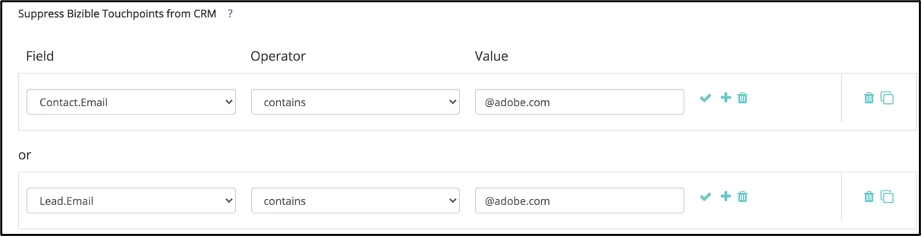
Note: In situations like this, it makes sense to suppress both the Lead and Contact value.


Example 2: Suppressing unsubscribe forms, password reset forms, career application forms, customer login forms


Why?

If the Marketo Measure JavaScript is properly attached to a form, people filling out that form will result in a touchpoint. Most customers do not want Touchpoints for things like the above where it’s just not the type of interaction we’re looking for when it comes to attribution reporting.


Build Idea:

Important Note: Use the matches any operator when you want Marketo Measure to look out for multiple values. The double asterisks creates “contains” logic. Your rule logic will also depend on your URL structure.


Example 3: Suppressing Buyer Attribution Touchpoints (BATs) that happened a defined number of days before the Opportunity is Opened/Created


Why?

Sometimes customers want to set up a “look-back window” to basically say that if a Touchpoint happened a certain number of days prior to the Opp being created, that it shouldn’t be eligible for attribution. Most clients align this to the length of their Sales cycle.


Build Idea:



Pro Tips:

  • Usually when you’re setting up suppression logic, you’ll want to do it for both the Buyer Touchpoint (BT) and the Buyer Attribution Touchpoint (BAT). Check out this resource for a refresher on the two objects.
  • Remember that Suppression gets rid of the Touchpoint in both CRM and Discover, whereas Removal will only remove the Touchpoint in the CRM, it will still be reportable in Discover. Suppression is most commonly used and Removal is usually only used in situations where CRM storage is a concern.

Last Updated 4/5/2024

This post is no longer active and is closed to new replies. Need help? Start a new post to ask your question.

14 replies

Kate_Colbert
New Participant
May 26, 2022

Hi Séverine. Apologies for a slow response -- I don't always see the notifications! 


Anyway, I suppose it depends on your exact use case but I pretty much always recommend using "Touchpoint.Session.FormPage" in these scenarios because that ensure it will suppress the touchpoint ONLY if they are on that particular page when they submit a form (like a job application form). 


If you used "Touchpoint.Session.ReferrerPage" I think it could have unintended results. For example, what if the career page was somehow their referrer but they then navigated to & filled out a form where you DO want a touchpoint, like an ebook download... in this scenario, the touchpoint would be suppressed due to its referrer if you built the rule this way. I don't think that's what you'd want so I'd recommend not trying to do it this way, just stick with Touchpoint.Session.FormPage! 


Hope this helps

-Kate

New Participant
May 12, 2022

@kate_colbert 
Awesome. These are really helpful tips and I will apply this suppression to one of my ongoing in implementation. Thank you.

New Participant
May 12, 2022

Hi Kate!


If I want to exclude touchpoints from a carreer page or a client portal - instead of using "Touchpoint.Session.FormPage" can I directly use the following rule:

"Touchpoint.Session.ReferrerPage contains xxxx.com" with xxxx.com being the page where the form is located?


Thank you,


Séverine


Kate_Colbert
New Participant
May 25, 2021

Hi @jeffchao -- glad to hear the webinar was helpful & thanks for attending! 


It sounds like your main goal with this particular suppression is to free up some CRM storage? If that's the case, I'd recommend a slightly different approach. Suppressing based on the age of the touchpoints (Create Date) and/or the age of the Opportunity (Create Date) might be a more efficient way to cut down on touchpoint data, especially if you've been a Bizible customer for multiple years. 


I'd also suggest considering suppressing certain Opportunity Types if you have ones that maybe aren't significant for reporting. 


I personally probably wouldn't suppress based on Opportunity Stage because I think it's valuable to be able to tell the story of Opps when they're Open, Closed Won and Closed Lost. 


Hope this helps! 

Ariel_Sasso
New Participant
May 19, 2021

This is fantastic, thank you for sharing!

Ariel Sasso
New Participant
May 19, 2021

Hi Kate,

Thanks for presenting in "The A-Z of Bizible Attribution Model", the content is very helpful and I really enjoy it.

I have a question about suppressing BAT and hope you can give me some advice. I'm trying to reduce BAT storage in our SFDC. Right now, I already suppressed the "Closed-Lost" BAT, but the storage usage still too high. I'm thinking to suppress the BAT from opportunities whose stage is "Open" or "In progress".

My question is that if there is an opportunity whose stage change into "Closed-Won", does Bizible will consolidate related BAT into the opportunity?


Thanks,

Jeff

Kate_Colbert
New Participant
May 18, 2021

Hi Bonnie -- I haven't tried a combination suppression exactly like that before but it does sound like it should work. Though it's important to be aware that it would only suppress the touchpoint records when the channel is hosted or sponsored events that were created 180 days before the Opp was created -- not just any touchpoint that old.


Bonnie_Goldswor
New Participant
May 12, 2021

Thanks Kate - but the suppression logic makes sense for this particular scenario, yes? If so, I can take up with my consultant. There's been some back and forth with the support teams - they don't believe you can institute rules that are based on time decays etc. I'll link to this blog, though, so maybe that will help!

Kate_Colbert
New Participant
May 11, 2021

Hi Bonnie, 


Thanks for reaching out! Unfortunately I don't think I can help you diagnose this specific scenario here because I would need access to your Bizible account and specific examples (Email addresses, Touchpoint IDs, etc) to assess how to potentially tweak the rule. 


If you are in Implementation still, I recommend asking your consultant! Or if you are past Implementation, I would reach out to Support with your above message and the specific examples 🙂

Bonnie_Goldswor
New Participant
May 8, 2021

@kate_colbert  I'm trying to use example #3 and i'm having some difficulty with the logic. 


Currently, we suppress attribution from events if the opportunity is created 180 days or more AFTER the date of the event (which is also the touchpoint date). So, i built: 

Opportunity.CreatedDate - Touchpoint.Date (Days) is greater than 180 AND touchpoint.channel = hosted events (and another logic build for sponsored events). 


Yet, i'm still seeing events with touchpoint dates in 2019, and attribution tied to opportunities created in 2021. 


What did i do wrong?