If/Else Multiple Conditions - or Switch?? | Community
Skip to main content
July 8, 2011
Solved

If/Else Multiple Conditions - or Switch??

  • July 8, 2011
  • 13 replies
  • 9540 views

Am posting new info on a topic I posted in the wrong category (http://forums.adobe.com/thread/873889?tstart=0) in the hopes that moving it to correct category and providing new info will help.  My form has a value field, and based on the values, radio buttons would be checked accordingly.  The below working code is set as JavaScript on the calculate event of the radio box in question.  All is well so far, it works fine.

The next step am trying to accomplish is that there is another radio box where they would check the Type - A, B or C.  Except for a Type B, the below is in effect.  However, if Type B is selected, regardless of value below, the classification should ALWAYS be set to "1".  So a value of 1,000,000 AND marked as Type B would be classification 1, for example.

I believe the address of the radio group I need to test against is:

form1.sfrmMain.sfrmMainSub1.sfrmMain2.tbMainInfo.Row4[8].sfrmIdeaCAT.rType.rawValue;

But when I try to set a variable in below to use it in the code, it makes the other code not work.  Any ideas how to approach this - is there a simpler way?  Have checked into switch statements but have not been successful in converting below.  Any ideas would be appreciated, thank you.

WORKING CODE:

var myVal = form1.sfrmMain.sfrmMainSub1.sfrmMain2.tbMainInfo.rowEstimates.tblEstimates.Row1.sfrmEstimates.nSavings.rawValue;
var myClass = form1.sfrmMain.rSavClass.rawValue;

if(myVal >= 1000 && myVal <= 9999)
{
myClass ="1";
}
else
if(myVal >= 10000 && myVal <= 24999)
{
myClass ="2";
}
else
if(myVal >= 25000 && myVal <= 99999)
{
myClass="3";
}
else
if(myVal >= 100000 && myVal <= 999999)
{
myClass="4";
}
else
if(myVal >= 1000000)
{
myClass="5";
}
else
{
myClass="0";
}

This post is no longer active and is closed to new replies. Need help? Start a new post to ask your question.
Best answer by Niall_O_Donovan

Hi,

Here is the form back to you: http://www.assuredynamics.com/wp-content/uploads/2011/07/2011-07-11-ShareVersion_Form.pdf

I will delete the link once you have the form.

There were a few issues:

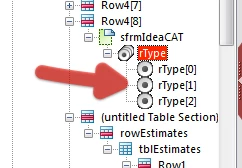
The rType radio buttons were all named the same as the exclusion group, so this is why it was resolving the node. I have renamed them:

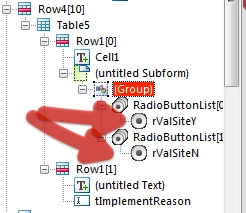
On the issue of radio buttons, there were three Yes/No questions where the choices were not in an exclusion group. I have paired these:

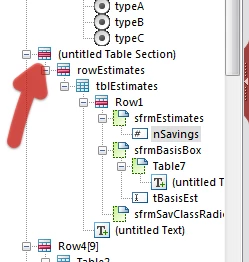
Objects, like nSavings were in unnamed containers, which makes scripting difficult (need to resolve the node):

In the script you are declaring a variable, which has the value of the object that contains the script. Then you are referring to that variable in order to set the value of the object. This is akin to the getField() method in Core/AcroForm JavaScript, but will NOT work here. Instead I have referred to the object using "this.rawValue".

The final script is here:

var myVal = sfrmMainSub1.sfrmMain2.tbMainInfo.section1.rowEstimates.tblEstimates.Row1.sfrmEstimates.nSavings.rawValue;

var myType = xfa.resolveNode("sfrmMainSub1.sfrmMain2.tbMainInfo.Row4[8].sfrmIdeaCAT.rType").rawValue;

// first check if Type B

if (myType === "2")

{

     this.rawValue = "1";

}


// then work through savings levels

else if (myVal >= 1000 && myVal <= 9999)

{

     this.rawValue ="1";

}

else if (myVal >= 10000 && myVal <= 24999)

{

     this.rawValue ="2";

}

else if (myVal >= 25000 && myVal <= 99999)

{

     this.rawValue ="3";

}

else if (myVal >= 100000 && myVal <= 999999)

{

     this.rawValue ="4";

}

else if (myVal >= 1000000)

{

     this.rawValue ="5";

}

else

{

     this.rawValue ="0";

}

I have made the saving classification checkboxes a light grey, so as to indicate that the user does not click these choices. I have also set the Type to Calculated - Read Only in the Object > Value palette.

Lastly, I have changed around the script for the Project Number-Year. Basically the way it was set up if a form that was filled in this year (2011), was opened next year, the reference would automatically change to Project Number-2012. I have changed it to always used the year from the submitted date.

I hope that this is now working for you,

Niall

13 replies

July 12, 2011

Done, thank you very much, Niall.

Niall_O_Donovan
New Participant
July 12, 2011

You are welcome Cathy.

I have removed the form and you can edit your post above to remove the original link.

Niall

July 12, 2011

Got the form, thank you so much, yes, that is exactly how I was needing it to behave.  I sure have a lot to learn, the form is very helpful to understand what I was doing wrong with my radio buttons and naming containers.  Also, in looking at your code and logic, I was making things way too complicated - first you checked to see if Type B was '2' before running the other value checks.

Thank you for catching the problem with the year, too, I hadn't thought about that, but am sure it would have cropped up next year, and appreciate your help very much.

Thank you, Cathy

Niall_O_Donovan
Niall_O_DonovanAccepted solution
New Participant
July 11, 2011

Hi,

Here is the form back to you: http://www.assuredynamics.com/wp-content/uploads/2011/07/2011-07-11-ShareVersion_Form.pdf

I will delete the link once you have the form.

There were a few issues:

The rType radio buttons were all named the same as the exclusion group, so this is why it was resolving the node. I have renamed them:

On the issue of radio buttons, there were three Yes/No questions where the choices were not in an exclusion group. I have paired these:

Objects, like nSavings were in unnamed containers, which makes scripting difficult (need to resolve the node):

In the script you are declaring a variable, which has the value of the object that contains the script. Then you are referring to that variable in order to set the value of the object. This is akin to the getField() method in Core/AcroForm JavaScript, but will NOT work here. Instead I have referred to the object using "this.rawValue".

The final script is here:

var myVal = sfrmMainSub1.sfrmMain2.tbMainInfo.section1.rowEstimates.tblEstimates.Row1.sfrmEstimates.nSavings.rawValue;

var myType = xfa.resolveNode("sfrmMainSub1.sfrmMain2.tbMainInfo.Row4[8].sfrmIdeaCAT.rType").rawValue;

// first check if Type B

if (myType === "2")

{

     this.rawValue = "1";

}


// then work through savings levels

else if (myVal >= 1000 && myVal <= 9999)

{

     this.rawValue ="1";

}

else if (myVal >= 10000 && myVal <= 24999)

{

     this.rawValue ="2";

}

else if (myVal >= 25000 && myVal <= 99999)

{

     this.rawValue ="3";

}

else if (myVal >= 100000 && myVal <= 999999)

{

     this.rawValue ="4";

}

else if (myVal >= 1000000)

{

     this.rawValue ="5";

}

else

{

     this.rawValue ="0";

}

I have made the saving classification checkboxes a light grey, so as to indicate that the user does not click these choices. I have also set the Type to Calculated - Read Only in the Object > Value palette.

Lastly, I have changed around the script for the Project Number-Year. Basically the way it was set up if a form that was filled in this year (2011), was opened next year, the reference would automatically change to Project Number-2012. I have changed it to always used the year from the submitted date.

I hope that this is now working for you,

Niall

July 11, 2011

There seemed to be firewall issues getting the file uploaded to acrobat.com, so it is temporarily available at this link:


Message was edited by: sparrowce
link removed

July 11, 2011

Hi Niall, I really appreciate your help and patience. I do not know what to do next.  Have signed into Acrobat.com, got my workspace/folder set up, it's a very nice site, by the way.  However, when I try to upload the file, it tells me Acrobat.com encountered an unexpected error, and when I click into the 'More info' twistie, it just says 'unexpected error'.  Tried uploading a different file in case there was a problem with the one I'm working with, but it wouldn't upload either, and also tried uploading to personal workspace, shared workspace.  Are there some other settings I need to change?

Thank you, Cathy

Niall_O_Donovan
New Participant
July 11, 2011

Hi,

Can you share your form?

If so, upload it to a file sharing site like Acrobat.com and then publish it. You can then post the published URL here:

Niall

July 11, 2011

Can you tell I'm a noobie . . . don't know why I'm resolving the rType object except that's what it gave me when I held the contol key and clicked on it to get the address, so I don't know what I'm doing.  When I add .rawValue to it,

var myType =  xfa.resolveNode("rType").rawValue; 

the code for the calculations stops working again, I do not understand why declaring the variable (in this case haven't used it yet, can't get past the declaration) breaks the code that was working.  I tried to follow the instructions for this,

console.println("myType is: " + myType);

but am missing understanding how to implement, as nothing seems to happen. Have been studying declaring variables, but no luck yet, and have surely gotten myself into a mess on this one, so sorry I am not there yet.

Niall_O_Donovan
New Participant
July 11, 2011

Hi,

Why are you resolving the rType object? Unless there are multiple rType objects or you have unnammed subforms, you should be able to use a relative reference.

Also, xfa.resolveNode("rType") will only return the object. You would need .rawValue to return the value of the object. So:

var myType =  xfa.resolveNode("rType").rawValue; 

Having said that you should try and avoid resolving the node.

The && is correct notation for "and". The || is correct notation for "or".

When testing inequality I would use !=, so:

if(myType != 2 && myVal >= 10000 && myVal <= 24999)

{

     //

}

A good way to check that you are assigning the values correctly, would be to use the JavaAcript Console (Control+J) in Preview or in Acrobat.

After decalring a variable, place a line line below after the variable is declared:

console.println("myType is: " + myType); 

When you interact with the form, if the script fires you will see something like this in the console:

myType: 2

Hope that helps,

Niall

July 11, 2011

Thank you, the link was helpful in getting the references squared away.  I feel like this is so close, but just not there yet.  I'm back to the rSavClass radio group, calculate event, javascript language, as nothing else was working.  I have tested below reference to rType variable (var myType = xfa.resolveNode("rType"); with a message box, and was able to display a message box if Type B was pressed, so hopefuly that should allow the myType variable to be used in below code.  However, the syntax is what I'm struggling with.  In this link, http://javascript.about.com/library/bldes08.htm, it shows the syntax for AND, OR and NOT operators.  I am needing to test for Type B value == 2 in each of the statements below, if Type B is pressed, myClass will always be "1", otherwise, carry on with checking for values, but not sure how to do that correctly.

Tried this (with and without quotes around the 2), if(myType <> 2 && myVal >= 10000 && myVal <= 24999), but it caused none of the code to work.

Any ideas where I'm messing up?  Thank you for the help.

var myVal = form1.sfrmMain.sfrmMainSub1.sfrmMain2.tbMainInfo.rowEstimates.tblEstimates.Row1.sfrmEstimates.nSavings.rawValue;
var myClass = form1.sfrmMain.rSavClass.rawValue;
var myType = xfa.resolveNode("rType");

if(myVal >= 1000 && myVal <= 9999)
{
myClass ="1";
}
else
if(myVal >= 10000 && myVal <= 24999)
{
myClass ="2";
}
else
if(myVal >= 25000 && myVal <= 99999)
{
myClass="3";
}
else
if(myVal >= 100000 && myVal <= 999999)
{
myClass="4";
}
else
if(myVal >= 1000000)
{
myClass="5";
}
else
{
myClass="0";
}