Workflow send email variables | Community
Skip to main content
ayecona
New Participant
August 27, 2019
Solved

Workflow send email variables

  • August 27, 2019
  • 11 replies
  • 10429 views

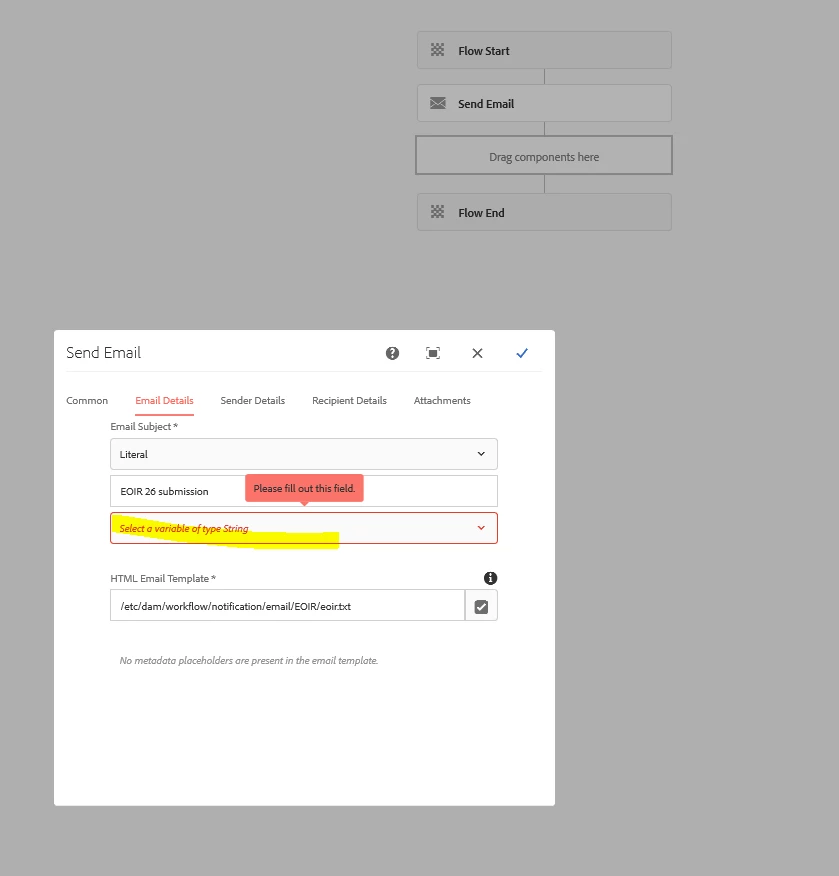
I upgraded from AEM 6.4 to 6.5 as well as with forms, I had a workflow package that I created in 6.4 and it did not have the dropdown for a variable. now they wont work. can you please tell me how do I go about fixing this workflow?
This post is no longer active and is closed to new replies. Need help? Start a new post to ask your question.
Best answer by ayecona

workflowuser

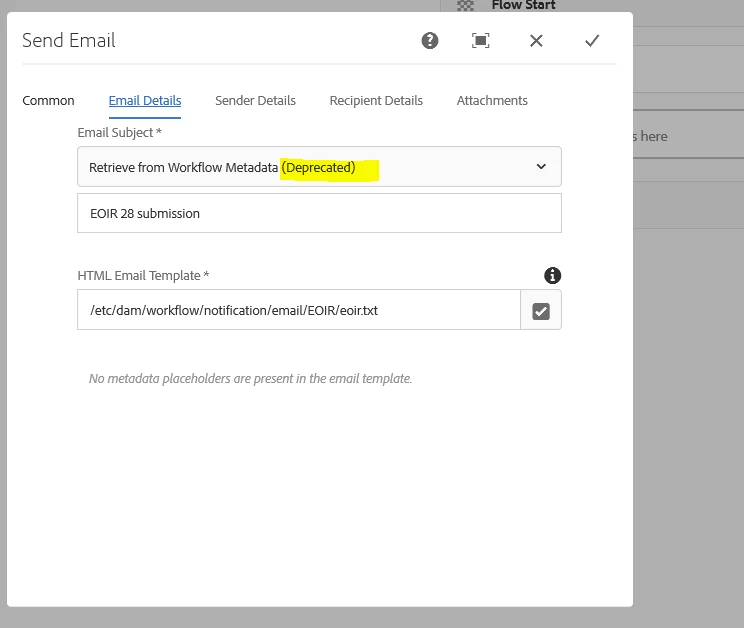
the deprecated one worked..... jummmm… you guys need to fix the new one.

11 replies

ayecona
ayeconaAuthor
New Participant
August 28, 2019

workflowuser​ it is working now. I have solve the issue. no further help needed. the deprecated one work as I stated above. I will try the new one once I see the drop down menu for variables do not show up again. I guess there should be an update. the pictures above shows you the problem

Employee
August 28, 2019

Send us yournworkflow package

ayecona
ayeconaAuthor
New Participant
August 28, 2019

workflowuser​ look at the picture I have chosen literal and then the variable drop down shows up. so I am chosing what made it work. then the system is even more buggy than I thought.

Employee
August 28, 2019

In your case you have to select literal from the drop down list for the email subject and type in value

if you are selecting metadata then you should have created a metadata property by that name which I do not think is the case

ayecona
ayeconaAuthorAccepted solution
New Participant
August 28, 2019

workflowuser

the deprecated one worked..... jummmm… you guys need to fix the new one.

ayecona
ayeconaAuthor
New Participant
August 27, 2019

nop it doesn't let me

Employee
August 27, 2019

Try creating a new workflow and see if itnis any different with send email component

ayecona
ayeconaAuthor
New Participant
August 27, 2019

it still wants me to do that

Employee
August 27, 2019

Or just drag a new send email component and configure its settings again

ayecona
ayeconaAuthor
New Participant
August 27, 2019

what do I need to do please it wont let me choose anything there isn't anything to choose. what if I don't want to use a variable. it wont let me save the workflow. I chose a literal and as you can see it says "EOIR 26 submission" but it still wants me to choose a variable